
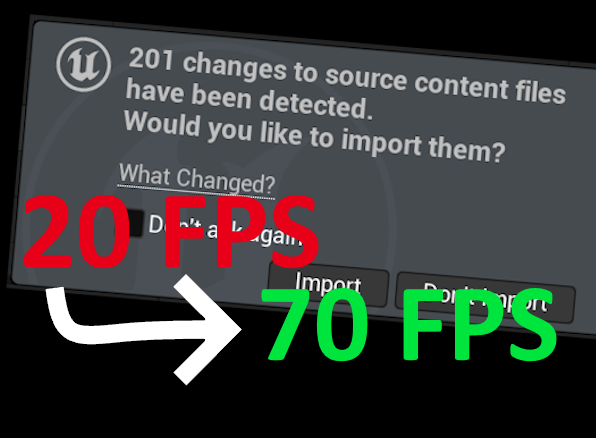
A short story about some unexpected framerate caps in the Unreal editor and how to fix them.
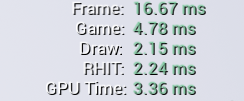
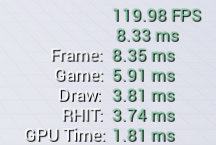
These are the in-editor performance stats of a fairly minimalist prototype I am currently tinkering with. Most Unreal devs are familiar with this high-level overview. It shows how long the different tasks that are done to display the current frame take. In this example the execution of the gameplay code takes almost 5ms, in parallel the scene is being prepared for rendering on some other threads, which takes about 2ms, and the actual rendering of the previous frame takes a little over 3ms.
On first glance those numbers don’t seem unusual, right? I thought so too, but after a few seconds I realised that the numbers didn’t really add up. Theoretically, since all these tasks are done in parallel, the whole frame should take as long as the longest running tasks – so in this case the whole frame should take 5ms, since the gameplay code takes 5ms to execute. Instead, the total frame time is more than three times as long – 16.67ms! Somehow the game seems to be running at 60 fps when it should be running at 200.
At this point I wasn’t too worried. By default Unreal will clamp the framerate of new projects, I probably just forgot to turn it off. So I went into the project settings to turn off the clamping.
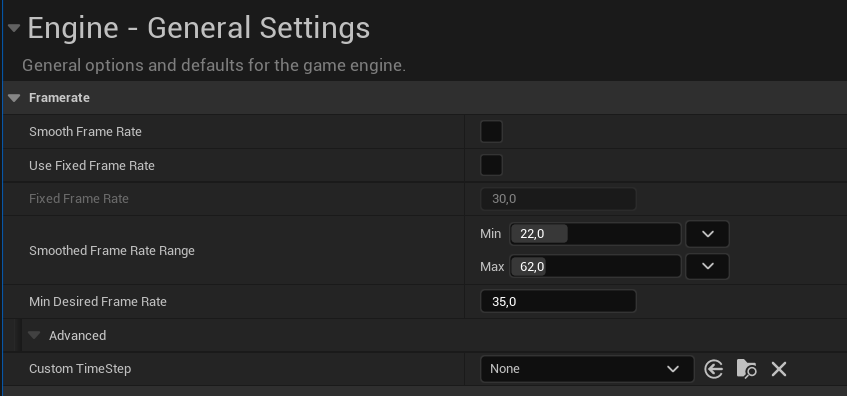
No, it wasn’t, the project was already supposed to run at an uncapped framerate. So why wasn’t it? VSync couldn’t be the reason either, it doesn’t work in the editor at all. I even went into the Editor preferences to check the “Use less CPU when in background” option.

So I did the only logical thing you can do when a game doesn’t run at the framerate you expect: I downloaded over 30 GB of debug symbols and attached a CPU profiler to my editor. A minute later I was looking at the results in Superluminal.
And it didn’t take long to find the culprit. My editor was spending most of its processing time on a function called “UpdateTimeAndHandleMaxTickRate”. So even though I hadn’t set a framerate limit, Unreal was apparently using one (and spending most of its time just waiting to start rendering the next frame).

Now I just had to find out where the framerate limit came from. This is one of those times when I am really grateful that the Unreal Engine source code is easily accessible. After a short search, I found the place in the code where the engine waits for the frame rate limit.

For some reason, GetMaxTickRate() returned a value of 60 instead of the expected 0, indicating that there was no maximum tick rate. Where did the 60 come from? From that particular point in GetMaxTickRate():

Apparently, the Unreal editor throttles itself back to 60 fps when it detects that the device is running on battery, in order to save power and extend battery life. This makes a lot of sense, especially to anyone who has tried using Unreal on an unplugged laptop. Unreal is a huge power hog, and limiting the in-game frame rate for a few extra minutes is a good deal. There is just one small problem: My laptop wasn’t running on battery, it was firmly plugged into a perfectly good wall socket. FPlatformMisc::IsRunningOnBattery seems to return the wrong information, even though it is a very short function.
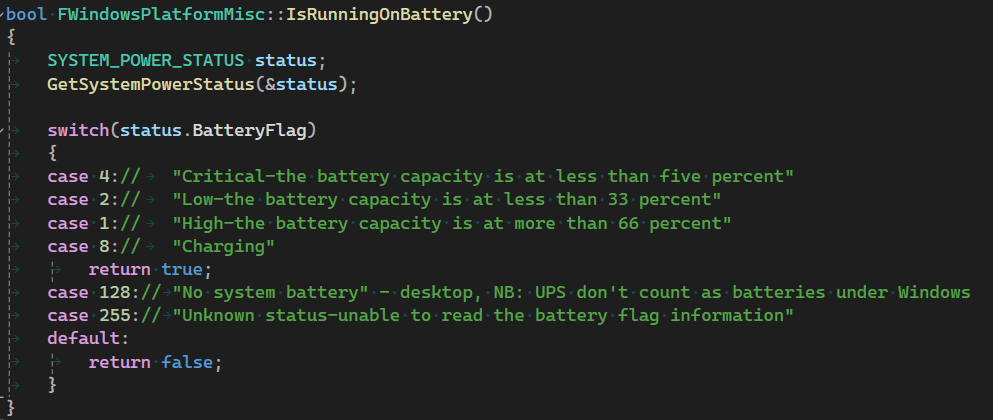
It asks for a “power status” and, depending on a magic (but at least well commented) flag within that power status, determines whether the device is currently using the battery. In my case, this flag was always set to ‘1’, which the corresponding comment describes as “the battery capacity is more than 66 percent”. This is technically correct, but also rather meaningless, as my laptop was connected to the mains and was perfectly capable of drawing as many watts as it wanted. Another piece of information within the power status was completely ignored: the ACLineStatus flag.

This contains information about whether the device is plugged in or not. So let’s quickly add a check to the function.
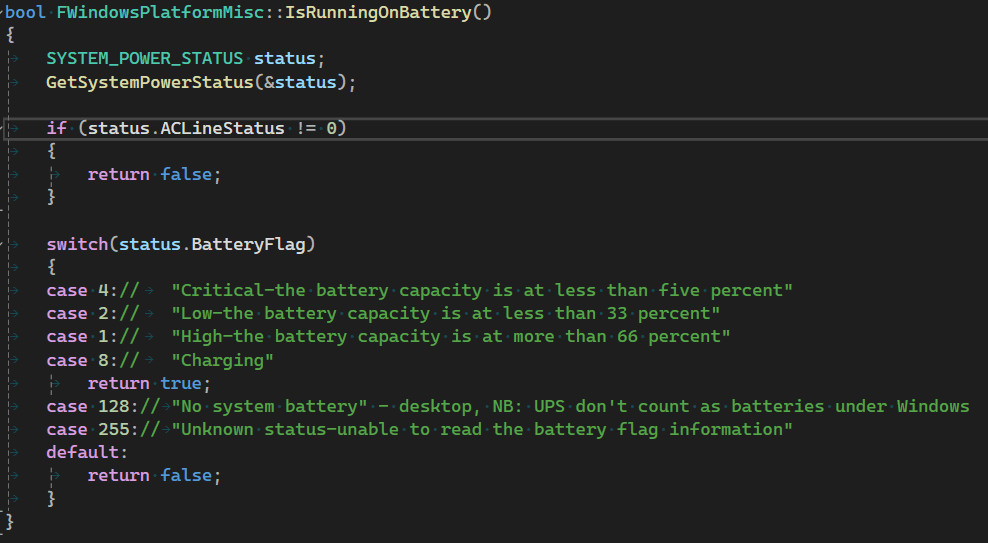
With that small addition, the function actually returns false if the device is plugged in, therefore no framerate limit is applied. So let’s just add this, wait a few minutes to compile this change, and voila:
Wait – this is still not what we expected – there are still over 2ms missing. What is happening here? It turns out that the Unreal editor insists on clamping the frame rate, even if we have specifically disabled frame rate limiting.
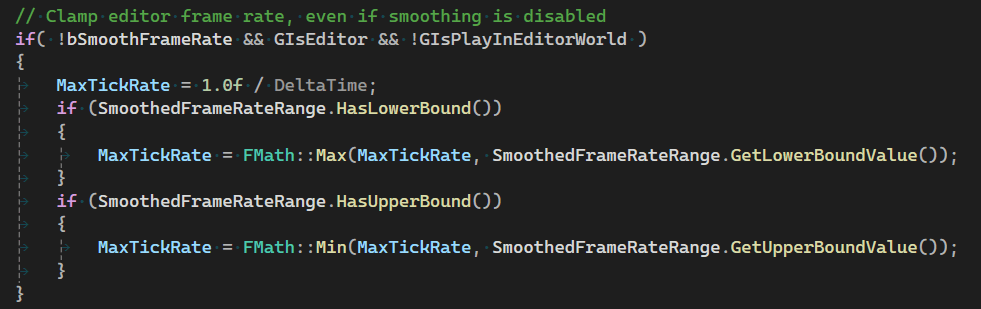
The really annoying thing is that in this case Unreal uses the default framerate caps from the project settings, even though our settings clearly state that they shouldn’t be used. Unlike the battery problem, the behaviour here seems to be clearly intentional, unfortunately the comment does not explain why. But there seems to be no inherent technical reason, as we can easily circumvent the limit with a simple workaround. By explicitly enabling framerate smoothing, but then setting its limits to unbound, the editor finally runs at the unlimited framerate we want.
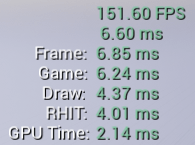
Interestingly, explicitly enabling framerate smoothing completely skips the on-battery framerate limit. This seems to be another bug in the engine code. Just because you set a framerate limit of 120, you don’t want to disable the battery-saving 60 fps limit. The lower of the two should be used instead.
Can I fix this behavior without needing to compile my own engine?
If you just want to remove the framerate limiting in the editor, it is sufficient to explicitly enable framerate smoothing and then set the limits to unbound. If you want to keep the ability to automatically limit the framerate when running on battery, the engine change is still required.
Shouldn’t there be a pull request to fix those bugs?
Yes definitely. Creating pull requests for the Unreal engine is always quite a hassle, so I haven’t done this yet, but I will update the article if I have done so.
Does this have any effect on the in-game framerate?
No, all this stuff only applies to the UEditorEngine, the UEngine doesn’t have any of these problems. But if you want to match the final game behaviour in the editor as closely as possible, you might still care about this.





 Larst Of Us
Leave a comment