
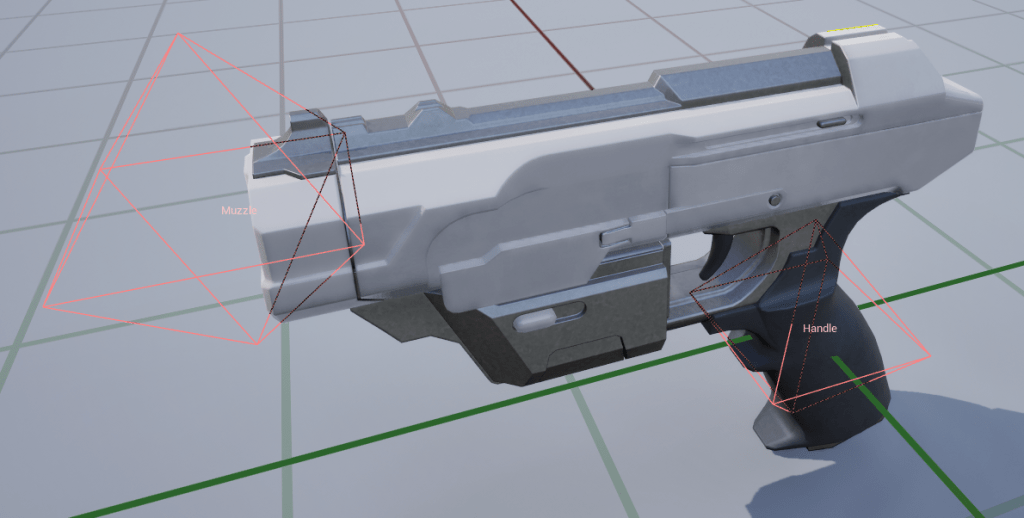
Static mesh sockets are one of Unreal’s most basic (and probably most used) features. Their main function is to mark arbitrary positions within a mesh so that code and blueprints can access them later. For example, to spawn a muzzle flash at the correct end of a weapon:
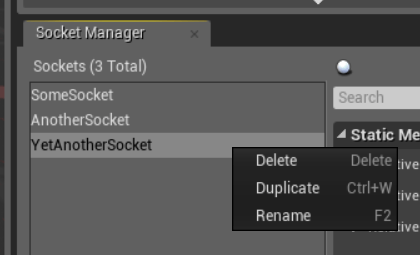
But even in Unreal 4.0 – 10 years ago – the socket editor always felt strangely out of place. Copy and paste didn’t exist for sockets, nor did support for selecting multiple sockets at once:
Fortunately, 10 years later, the socket manager in Unreal 5.4 has been significantly improved and…
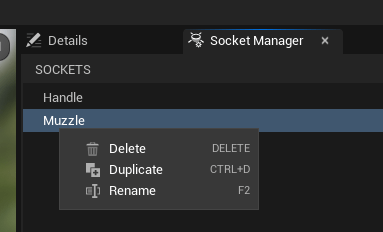
Oh. Well, at least the shortcut for duplicating things has finally been changed to Ctrl + D, which is an improvement. So let’s duplicate some sockets, shall we?
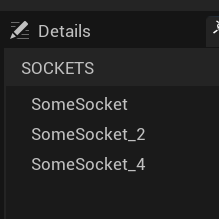
The sockets are there, but the naming convention of skipping every other number is annoying, especially if your gameplay code expects the socket numbering to be intact. In the example shown, which uses only a handful of sockets, this can be fixed manually. But if you need to create over 50 correctly numbered sockets in a single mesh, this becomes really, really painful. So let’s fix it.
Finding the problem
The first step is to find the code responsible for naming the duplicate sockets. Finding anything in the behemoth that the Unreal codebase has become at this point can be tricky, but this time I got lucky: my first text search for “DuplicateSocket” lead me to SSocketManager::DuplicateSelectedSocket, which seems to be exactly the place I was looking for:

First, the selected socket is duplicated using the general DuplicateObject function, then the name of the new socket is determined and set. There is also some other socket-specific stuff that happens afterwards, but we can ignore that.
Even before starting the debugger, this code looks strange. Why is “MakeUniqueObjectName” used to create a socket name? This function is used by Unreal (almost) every time an object is created and needs a new name. The “DuplicateObject” function that was just used also called it to create a new name for the socket object.
But the socket name used here is not identical to the internal object name, because it doesn’t need to be globally unique. Creating a unique object name to name a socket that doesn’t need a unique name seems like overkill. And indeed, this is the reason for the strange numbering.
Let’s say we start with a socket called “SomeSocket_0”. When we duplicate it, the DuplicateObject function calls MakeUniqueObjectName to create a unique name. As “SomeSocket_0” already exists, it increments the last number by 1, creating the name “SomeSocket_1”.
But this name of the socket object isn’t the name shown in the editor (and used to identify sockets). To do this, “MakeUniqueObjectName” is called again. As “SomeSocket_1” already exists, the function increments the number again to guarantee uniqueness – the resulting name is “SomeSocket_2” – even though there is no need to guarantee uniqueness between socket names and socket object names.
Fixing the problem
If “MakeUniqueObjectName” isn’t the right function to get our new socket name, we’ll have to write it ourselves. My first idea was to simply use the name of the selected socket and increment the number part of the name by one. But this quickly turned out to be too simple.
Let’s see how this approach would work on a simple example:

If we were to duplicate SomeSocket_3 using this method, we would create an identical name, breaking the whole use of unique names to identify sockets. Of course, we could just keep incrementing the number until we find a name that is unique. Even better would be a solution that noticed the existing gap in our socket names (SomeSocket_2) and used it instead.
So the final solution is to use the base name of the old socket and just look for the smallest number that hasn’t been used in combination with it:
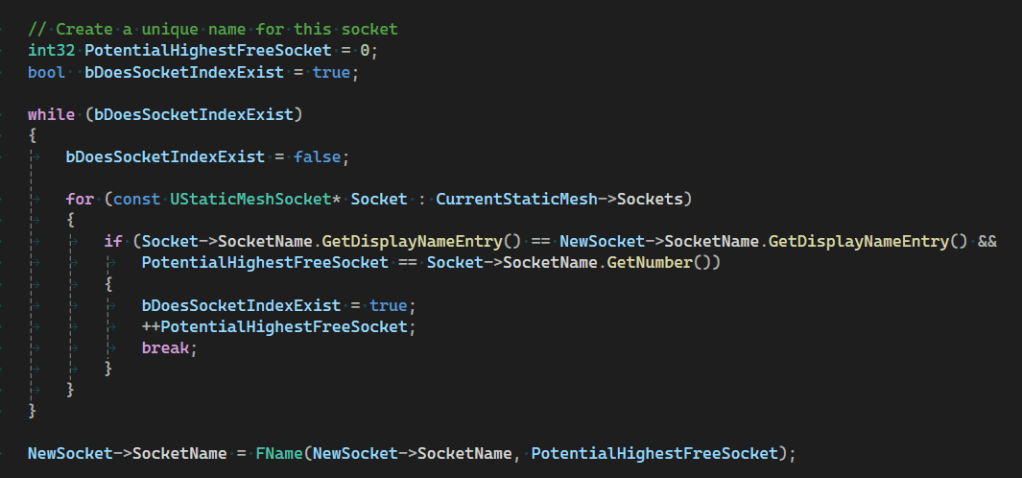
This turned out to be a bit more code than expected, and the nested loop doesn’t feel quite right from a performance point of view. But as long as you’re not using tens of thousands of sockets in a single mesh, it shouldn’t matter.
The result
The result is exactly the kind of numbering that you would expect to see:
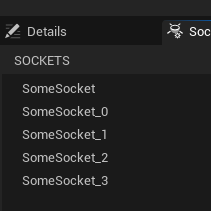
I’m still slightly annoyed by the inconsistency between “SomeSocket” and “SomeSocket0”, but that’s not really solvable without automatically renaming the first socket to use a number. And that is probably outside the behaviour users would expect when duplicating a socket. But even with that caveat, this solution is still a huge improvement for use cases with many numbered sockets, so I have created a pull request based on this fix:
https://github.com/EpicGames/UnrealEngine/pull/12270
Looking back, this fix turned out to be much easier than I expected. From opening Visual Studio to testing the working fix I spent less than an hour, which is far less time than I spent writing this article.
Maybe I should look into the missing features (copy & paste, multi-selection, reordering the socket list) next?






 Larst Of Us
Leave a comment