
In my last article (link) I described how to fix Unreal’s weird way of numbering duplicated mesh sockets. Fortunately, this was a quick and easy fix, but even then I wrote that the editor isn’t lacking in UI quirks. One of the more painful ones is the abundance of ways to select and edit multiple sockets at once.
Is this a problem? Probably not if you only need to place a very small number of sockets in a mesh. But let’s look at a slightly more complex example.
The problem
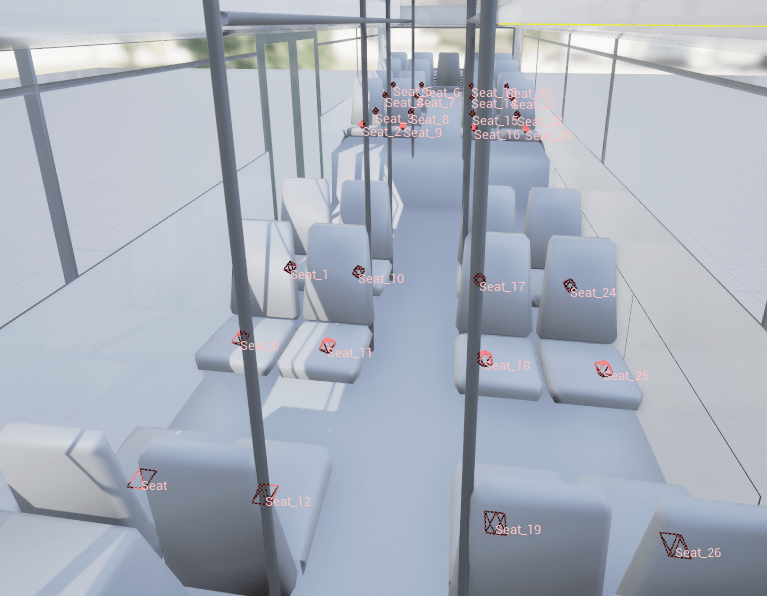
This is basically the first search result for bus on sketchfab (link):

I have already manually created all the sockets for one column of seats, so all I need to do is add the same sockets for the remaining three. But Unreal doesn’t allow you to select or copy multiple sockets at once, so I’ll have to add the sockets for the remaining 21 one by one. And even this bus is a pretty tame example – I already worked with meshes that needed over 100 individually placed sockets.
So, after fixing a bug in the last post, can we now add a completely new feature to the static mesh editor? The good news is: Yes, and it’s not even complicated if you’re familiar with Unreal and C++. The bad news is that it will involve a lot more typing. Unless you want to skip the next few paragraphs and just copy the pull request at the end 😉
Enabling multi-selection
Luckily, a lot of the code is already prepared for handling multiple selected objects. The socket list in the UI already offers a multi-selection mode, we just have to enable it in SSocketManager::Construct().
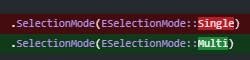
And voila, at least the UI is now convinced that we can actually select multiple sockets.

And on a way we can, since the selected items were already stored inside an array. The issue is just, that the rest of the editor code always uses the first item in this list.
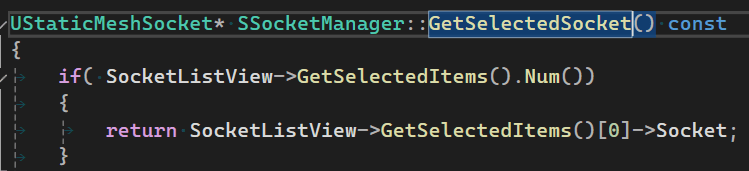
Replacing this function with a “GetSelectedSockets” function, which creates and returns a list of all selected sockets, only takes a few seconds. After that, the easy part begins: Going through all the places where GetSelectedSocket() has been used and adapting it to use a whole array of sockets. This is probably one of the most relaxing styles of programming, as most of the work is done by the compiler and we just have to adapt all the places it complains. In most cases just wrapping a loop around the piece of code that previously ran on a single socket is enough. A lot of typing later, we can run the editor again and … it just works. Duplicating sockets, deleting sockets, even moving and rotating them just works. Creating the missing 21 bus seat sockets is now a matter of seconds:
Follow up
So, are we done now? Well even though this technically works, there are quite some new problems and open questions that should be handled before calling it done. Number 1 should probably be the selection state.
Selection State
Looking at this picture, which socket do you expect to move when starting to drag on the translation Gizmo?
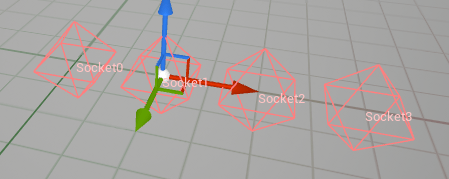
Socket1 is probably the reasonable answer, right? But not necessarily correct. In this case sockets 1-3 were selected.

Socket markers in the editor never had to show their selection state so far, since the gizmo would already indicate the selection. But now that more than one socket is selectable, that one gizmo isn’t enough, we have to communicate the selection state somehow differently now. Ideally we stay consistent to other selection systems while doing this. The next comparable selection system is the one for collision primitives that just uses a brighter color for selected instances (light green vs dark green):

So let’s steal this concept for the sockets. This way the selection feels instantly familiar:

Looking at sockets
The last feature to be updated was the ability to focus the camera on the current selection by pressing “F”. Since you can’t really focus a camera on an infinitely small object, Unreal creates a small box with a hardcoded size around the currently selected socket and focuses the camera on it. To change the behaviour as little as possible, my version creates a box around all selected sockets and adds the size of the old box to it. This way the behaviour doesn’t change at all if only one socket is selected.
Modifying the selection
So far mult-selection is possible, but just via the socket list in the UI. In most other scenarios clicking and other elements in the viewport can be used to add or remove those objects to/from a selection – our solution should cover this expectation, too.
Implementing this is straightforward, basically the same feature is already implemented for collision primitives in FStaticMeshEditorViewportClient::ProcessClick().

The only irritating part about this feature? Collision primitive selections can only be modified by holding Ctrl. In the normal level viewport also shift works (at least for adding to a selection). To keep at least the editor consistent in itself, I just followed this implementation, but I wonder if this might be an oversight. Might be worth looking into at another time.
The pull request
You can download the described change from my according pull request: link
It’s based on the current ue5-main branch, so you might have trouble if you are working on the current release version of 5.4.
(UPDATE: This just got merged! So I expect it to land in the 5.6 release. Yeah!)
Looking forward
There are still quite some twirks left in this editor, and the more time I spend working on them, the more new ones I find. Copy & paste support is still high on my wishlist, so is ordering the socket list. Also making socket names more readable would be worth a try, as at least I have trouble reading them:
But I’ll probably take a break from this specific topic – for now 😉




 Larst Of Us
Leave a comment