
If you are reading this blog, there is a good chance that you are also an Unreal Engine user. Which also means, that you have probably seen this innocuous looking notfication:
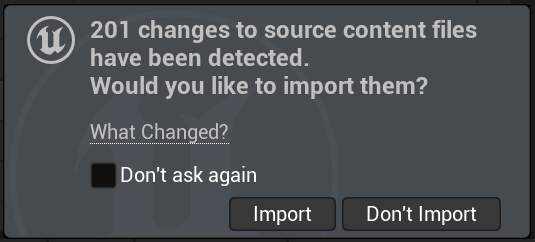
This notification is part of Unreal’s automatic asset reimporter. The responsibility of this tool is to prevent desyncs between source files like meshes, textures etc. and their imported versions inside the Unreal project. It does so by scanning a given list of source folders (which can be defined in the project settings) for changes which are more recent than the last import of this file. If any changes are detected, the tool opens the shown notification and offers the user to re-import the files.
The challenge
So far so good, but if you think about this feature from a performance-focused point of view you might be wondering: How do you check potentially tens of thousands of files continually without completely tanking the framerate of the editor? Projects can grow very big after all, with millions of assets.
Unreal’s solution
Luckily, the Unreal engine is quite smart about how to handle this giant task, and you can even see how it does this, by checking the involved classes FContentDirectoryMonitor and FFileCache in the engine source code. Most important to avoid any freezes of the editor is that all this scanning isn’t handled on the game thread, but on a separate thread via an async task. This way, even if the scanning of assets takes a while, the user won’t really notice, except that the notification about will be a few frames late.
The problem
The trouble starts after Unreal has found potentially outdated assets. Those are collected in a separate array called “DirtyFiles”. However, not all dirty files on this list are automatically considered for a reimport instead they are filtered again. Main criteria? The time since the last file modification needs to be higher than “Import Treshold Time”, an editor setting which is set to 3 seconds by default. This is probably a safety measure to prevent importing files that are still being written to from other processes. But even though this might be a good reason, this creates a big problem: We need to know the last modification time of every dirty file, and to know this, we have to ask the OS, which is often a very slow thing to do.

In contrast to the “normal scan” for changed files this update is executed on the game thread, the last place where you’d want to access a lot of files. In my example even a list of roughly 200 files takes up plenty of time, up to 50ms per frame. The effect on the editor framerate is as you’d expect: As long as this notification is open, even reaching 20 fps is a challenge, even if it runs at 60 fps or higher normally.
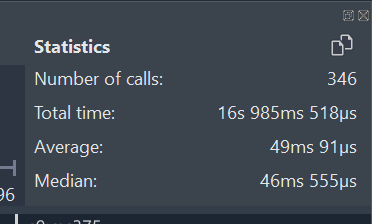
How do we fix this? There are multiple approaches we can take. First, we’d try to make the check itself faster, since 50ms seems an awful lot to access a few files. Looking at the profile data there is indeed a suspicious duplicate call to an OS function named GetFileAttributes().
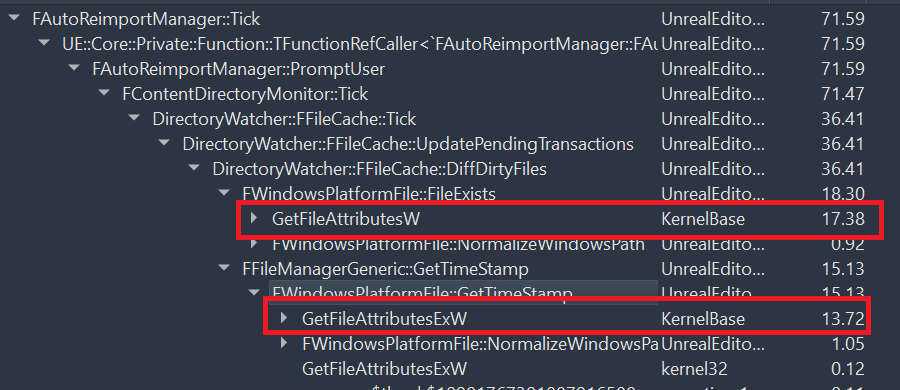
Why suspicious? Because it’s called via two different functions, FWindowsPlatform::FileExists and FWindowsPlatformFile::GetTimeStamp(), for the same file as you can see in the code example below. Note that the shown code isn’t exactly the original one but was simplified for clarity.

Before retrieving the attributes of the file which contain the file’s modification timestamp, the code first checks if the file actually exists by… also retrieving the file’s attributes. It basically asks the OS for the same data twice, the first time just to check if the second call will work. Instead we can just retrieve the timestamp directly, if the file doesn’t exist, this is indicated by an empty/default timestamp. The changed code looks something like this (again somewhat simplified here for clarity):
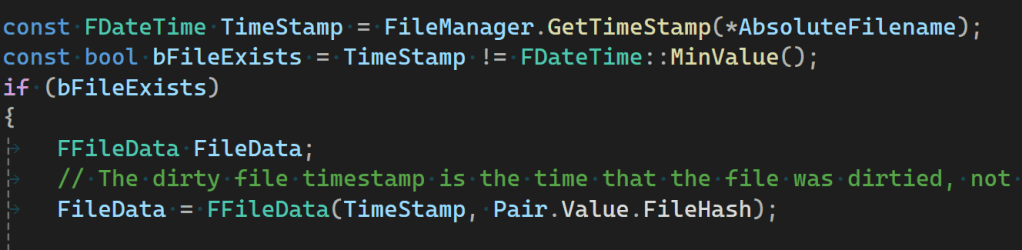
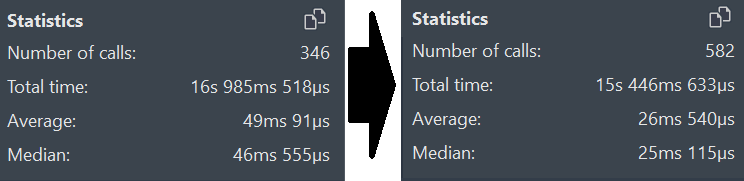
This way the file attributes only need to be retrieved once which should in theory almost halve the time of the overall check. Luckily, this actually holds up in practice:
If you want to test this change for yourself, you can take a look into its pull request here. Note that you must have your Epic Games account connected to your GitHub account and must be logged in to see the pull request. You can find more details here. (UPDATE FROM THE FUTURE: This pull request got merged and is now (5.8) part of the engine!)
Speeding a function up by a factor of two is already a good step, but in this context, this doesn’t feel good enough. After all, this popup should ideally not affect the framerate at all, since there is no good reason to let the current frame wait for the result of this check. To prevent this, we need to move it to a different thread. This can be done in a multitude of ways, for my fix I opted for the (in my opinion) simplest variant, just wrapping the calling function into a lambda which is executed async:
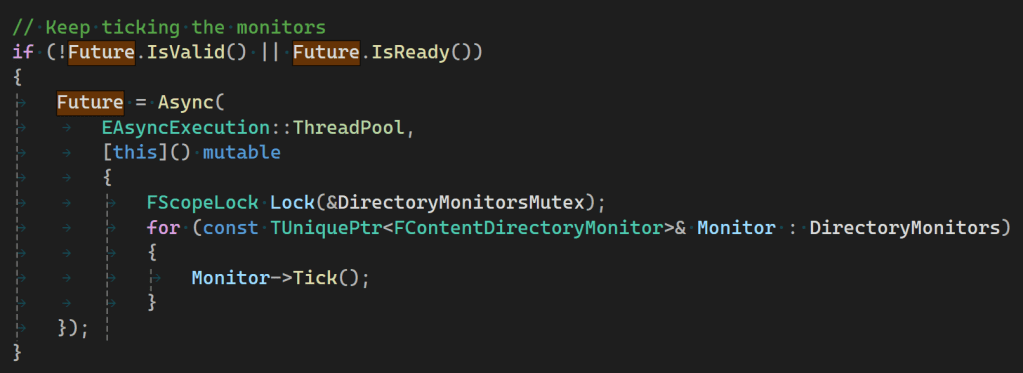
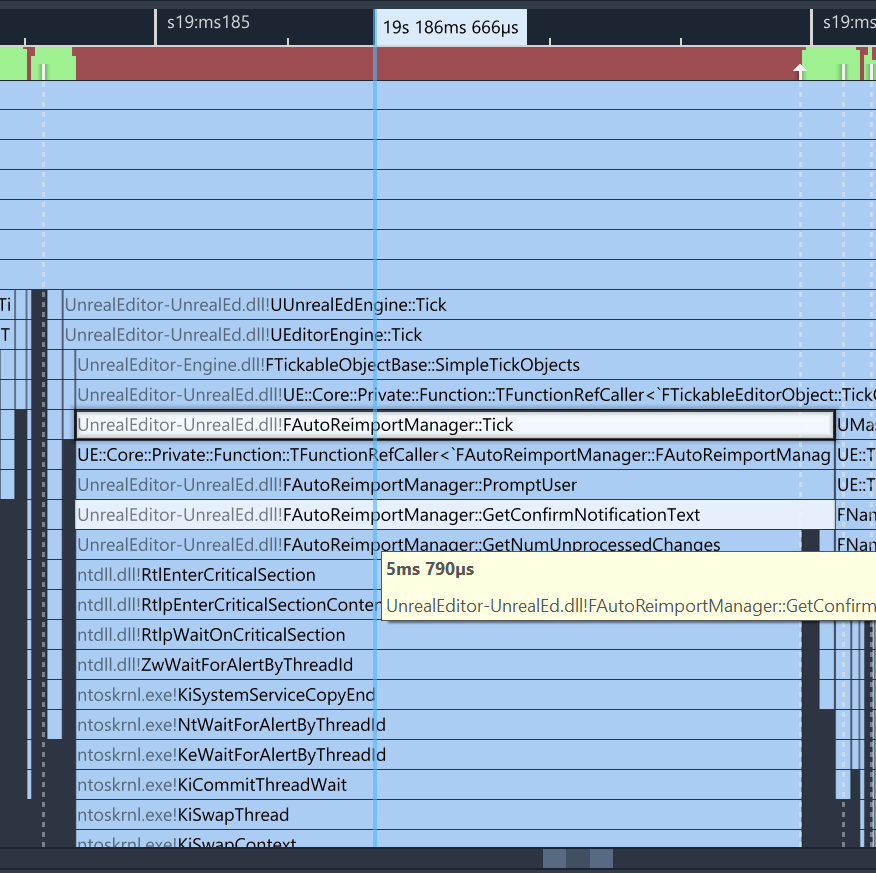
In this example you can also see the newly created mutex, which blocks other functions from interacting with the DirectoryMonitors array while the async task is running. Sprinkling mutexes doesn’t feel that elegant, and after a first test run, the profiler instantly shows the several drawbacks. The 26ms of file diffing are indeed not done on the game thread anymore, but one of the mutexes blocks the game thread, since right after launching the async task the GetConfirmNotificiationText() function accesses the mutex.
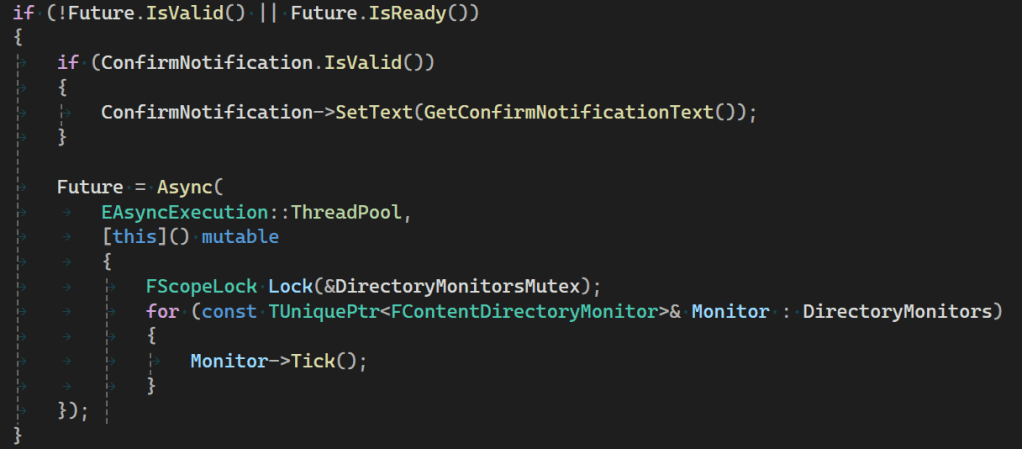
By moving a few lines around, we update the text before we start the async task, avoiding the stall:
And finally our profiling data looks exactly as it should, showing only around 0.1ms on the gamethread (down from almost 50), which is close to Superluminal’s sample interval. As with the previous change, you can also try this change for yourself, by taking the change from this pull request.
If this experiment was interesting to you, consider following me on other platforms like Mastodon, Bluesky or LinkedIn for more articles about Unreal, game optimization or other gamedev topics 🙂 You can also subscribe to this blog directly below this article to stay informed about future posts.


 Larst Of Us
Leave a comment