
Normally, if a developer complains that “naming stuff is hard,” they are talking about the difficulty of finding a good name that is descriptive, clear, and unambiguous. But sometimes, developers struggle not only with finding a good name, but with the actual process of getting their new name into their workspace. For me specifically, it was Unreal that was persistently throwing me new issues and blockers when I needed to rename widgets and assets. That’s when I finally decided that enough was enough. Let’s write some fixes!
(Note: I linked all my pull requests throughout the article. To actually open them you need to make sure that your Unreal account is linked to your GitHub account and you are logged in. You can find more information in the official documentation)
Issue 1: When Unreal refuses to rename stuff
The first one is one of those small, little annoyances that is easy to work around, but keeps popping up every so often that, at some point, you start to feel like the program does it on purpose to mess with you. I’m, of course, talking about the UMG editor sometimes refusing to rename a widget for you.
If you’ve ever done some UI work in Unreal, you probably know the situation: You want to rename a widget to something like “StartButton”, but in your haste, you just happen to hold the shift key for a millisecond too long, and your button ends up with the name “STartButton” instead. In an attempt to do things properly, you swiftly rename it, change the uppercase T to a t, press enter, and.. Unreal changes the name back to the wrong version.
This is because of a, in theory, very sensible check during Unreal’s renaming process. Every time a user tries to rename a widget, Unreal checks first if the new name is actually different from the old one, and only renames the widget if that’s the case, avoiding useless renames. In the code, this looks like this:

You can already see the cause of the bug here: the usage of FText::EqualToCaseIgnored() instead of EqualTo() prevents the rename process if the new name only differs in case. This was probably done intentionally, since blueprints are case-insensitive. Meaning that, from a technical perspective, there is no difference between “StartButton” and “StARTbuttOn”, Unreal even prevents you from having multiple widgets that only differ in case. If you use Windows, you are already familiar with this concept, as Windows handles filenames the same way. However, Windows does let you change cases when renaming files, since, for the user, case can make a big difference in readability. Nobody wants to work with a widget called “sTaRtBuTtOn” after all.
Fixing this issue in Unreal is straightforward: Replacing the function call with the case-sensitive variant EqualTo() solves the issue and lets the rename feature work as users expect. You can find the corresponding pull request here.
(✅Update from the future: This fix got merged for 5.8!)
Issue 2: The Batch Renamer renaming stuff unnecessarily
Everyone who has worked on a project of non-trivial size probably knows that the worst part about name changes is hunting down all the instances of the old name. One character changes their name from MeredithTheThird to MargotTheSecond, and suddenly 120 textures, 340 animations, and 129 voice lines need to be renamed just to maintain consistency.
Luckily, Unreal is prepared for such big renaming marathons and offers a handy tool for those occasions: The Batch Renamer
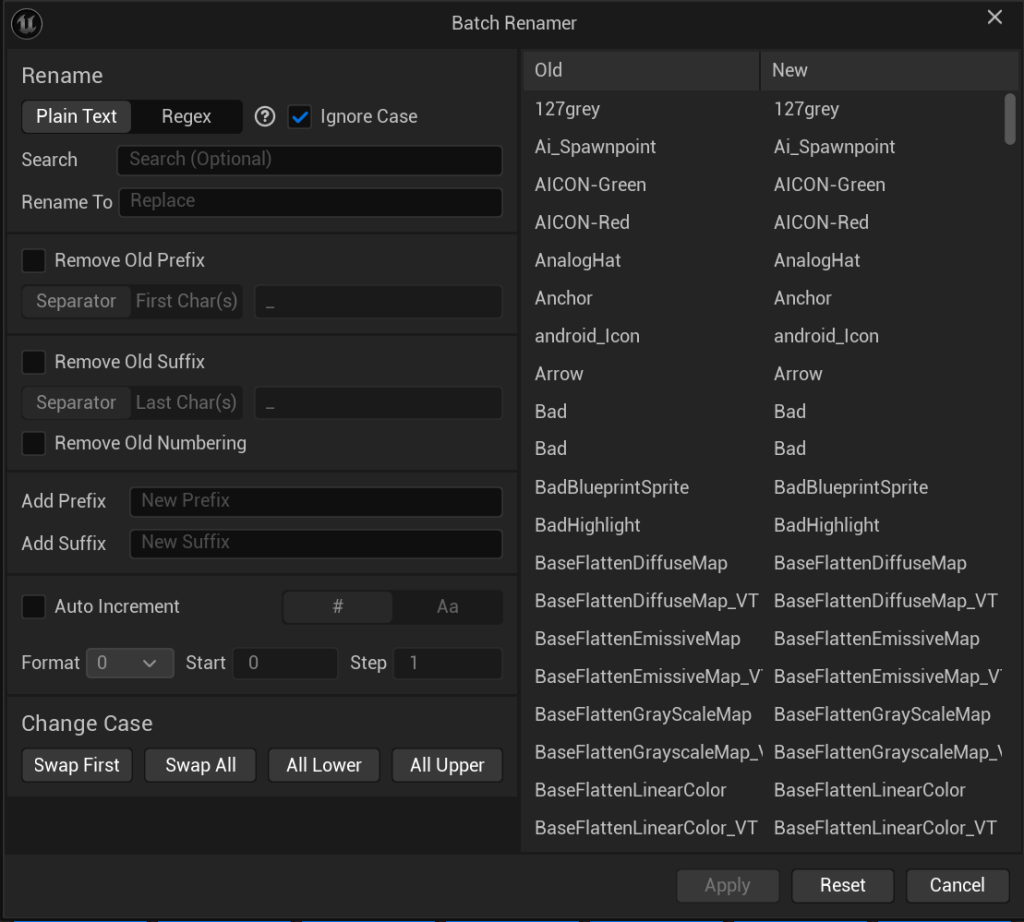
This tool allows renaming a bunch of assets in one go by defining a simple ruleset. You can replace substrings, add or remove prefixes, etc.
Interestingly, this tool has the opposite problem of the widget renaming: It doesn’t check if the new name is actually different from the old one. This means that an asset is renamed even if the given rules wouldn’t affect it, for example, because the asset in question doesn’t contain the substring to replace.
“But is this actually a problem?” you might ask now. After all, if the name is the same after renaming an asset, does it matter if it’s renamed or not? It does if you are using version control, such as Perforce (which you should!). Every asset renamed in the Unreal Editor will be marked as changed, and will be locked for all other users. Ideally, we should avoid unnecessary locks wherever possible to not disrupt workflows of other team members. In this case, I just added such a check to the tool (note that it’s case sensitive to avoid the problems mentioned before):

You can find the according pull request here.
Issue 3: When renaming stuff is forced on you
The last issue stands a bit out from the others, since it’s not about the renaming that has an issue – but a different feature requires things to be renamed to use them.
To explain the issue let’s take a look at this very simple example widget that I created, consisting just of two buttons inside a single canvas. No further changes were done to these two buttons.
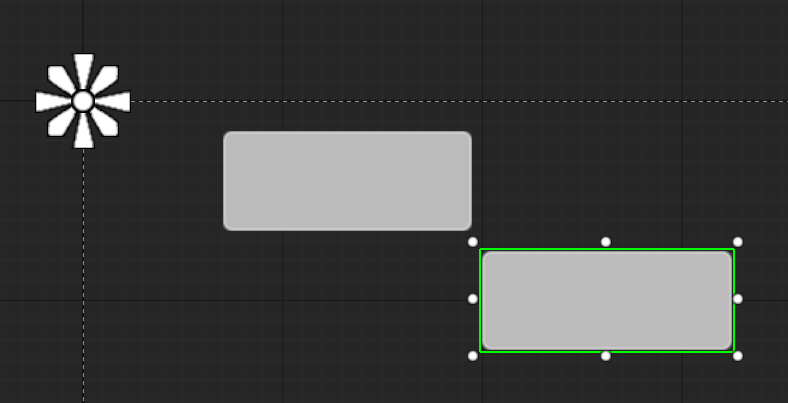
With the current layout, navigating between these two buttons via gamepad or arrow keys isn’t possible – they don’t align vertically or horizontally. If you’d like to give players this option you would need to explicitly set up the widgets as navigation targets inside the widget settings:
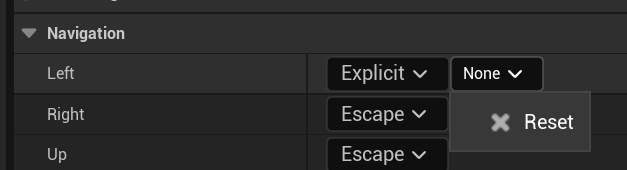
But wait, what’s that? The dropdown in which the other widget would be expected to appear is completely empty. Why could that be? Believe it or not, but it is because I skipped the step of renaming the widgets. Changing the names to literally anything else will fix the empty list:
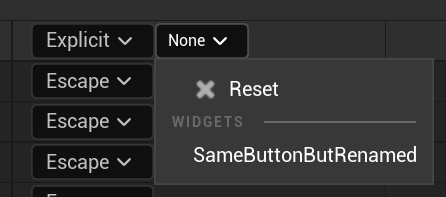
This is because Unreal filters the available widgets based on if they use the generated default name or were ever given a user-defined name:
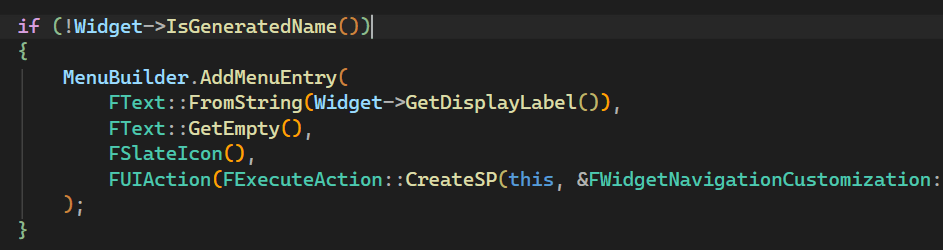
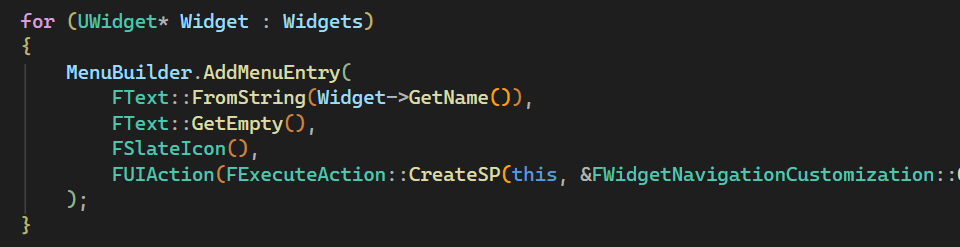
This might seem strange and is probably due to a misunderstanding of the developer writing this code. The menu showing the widget names uses the “DisplayLabel” of a widget to create the menu entry, which only returns a valid string if the widget was renamed manually. The code was probably written without the filtering first, which resulted in empty menu entries for widgets that hadn’t been renamed yet. Filtering out those widgets “fixed” the empty menu entries by simply not displaying them. By removing the check and simply using the widget name instead of the display label, we can fix those missing entries. You can find the pull request here.
Wrapping up
Was this already a complete list of naming related issues? Of course not. I didn’t go into why the first new button you create in a widget isn’t necessarily called Button_0 but Button_15 for example. But three fixed issues is enough for now. I’ll update this article accordingly, should any of the fixes shown here be merged. In the meantime, you can read about some of my changes that got merged here and here.
Or – assuming you liked this article – you can follow me and my blog on Bluesky, Mastodon, or LinkedIn. I’m posting new articles roughly every month, mostly writing about Unreal and performance optimization topics. See you soon!





Leave a Reply